
How I Built a Full-Stack AI App With a Real Database and No Engineering Team

By Kristine Ling · May 20, 2026 · 11 min read
I want to tell you about something I built called Plank, because the way it came together is the thing I keep thinking about.
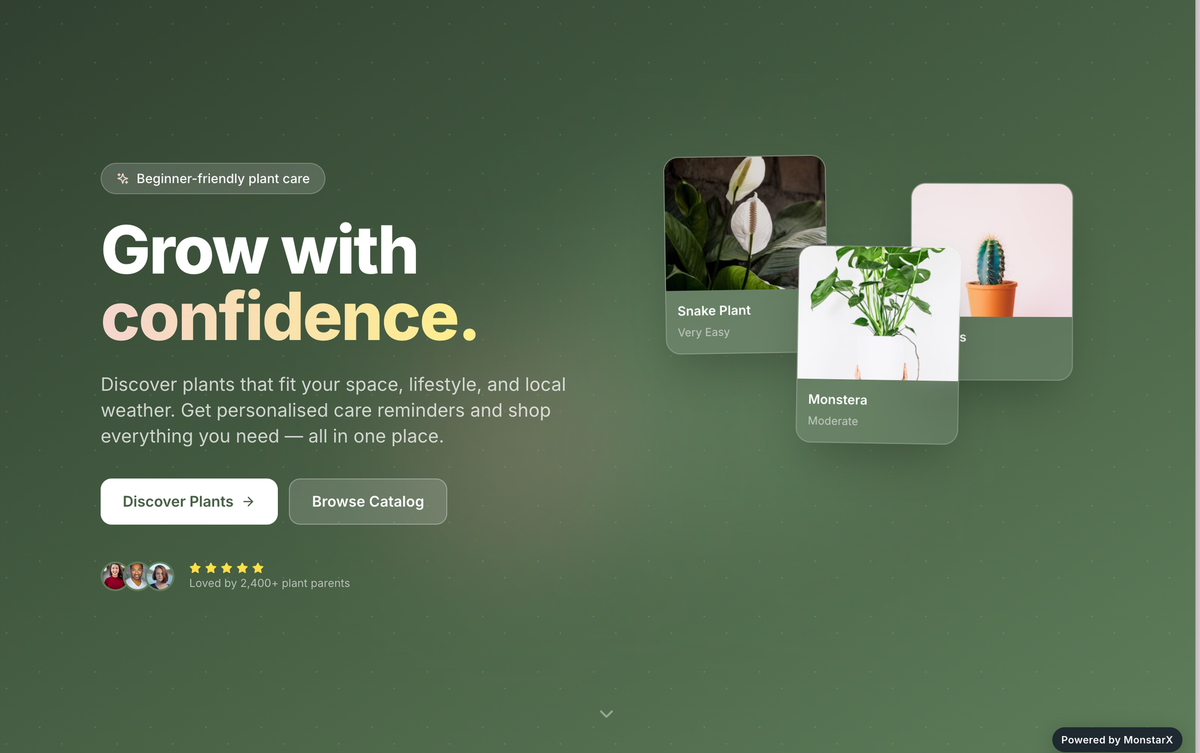
Plank is a plant directory with a working AI plant finder, a real database behind it, and user accounts. It is not a mockup. It is not a proof of concept. It is a live, deployed product that someone with zero technical background built without a single developer on the team.
What I used: MonstarX for the build, Supabase for the data, and OpenAI for the part that makes it feel smart. Three tools, one person, no traditional codebase.
I am going to walk you through what Plank actually does, how each piece of the stack connects, and what this whole experience taught me about where the barrier to building something real actually sits in 2026.
The Problem Plank Is Solving
Before I get into the how, I want to explain the why, because I think it matters for understanding why this particular product exists.
If you have ever tried to buy a houseplant and actually keep it alive, you know the frustration. You go to a nursery, you pick something that looks nice, you get it home, and three weeks later it is dead. You Google what went wrong and end up forty minutes deep in blog posts that all contradict each other, none of which are specific to your light conditions or your watering habits or whether you have a cat that treats every plant like a personal buffet.
There are plant apps and plant wikis and plant blogs, but most of them solve only part of the problem. They either give you a directory with no real guidance, or they give you care tips with no way to discover what to buy in the first place, or they are organised in a way that assumes you already know what you are looking for.
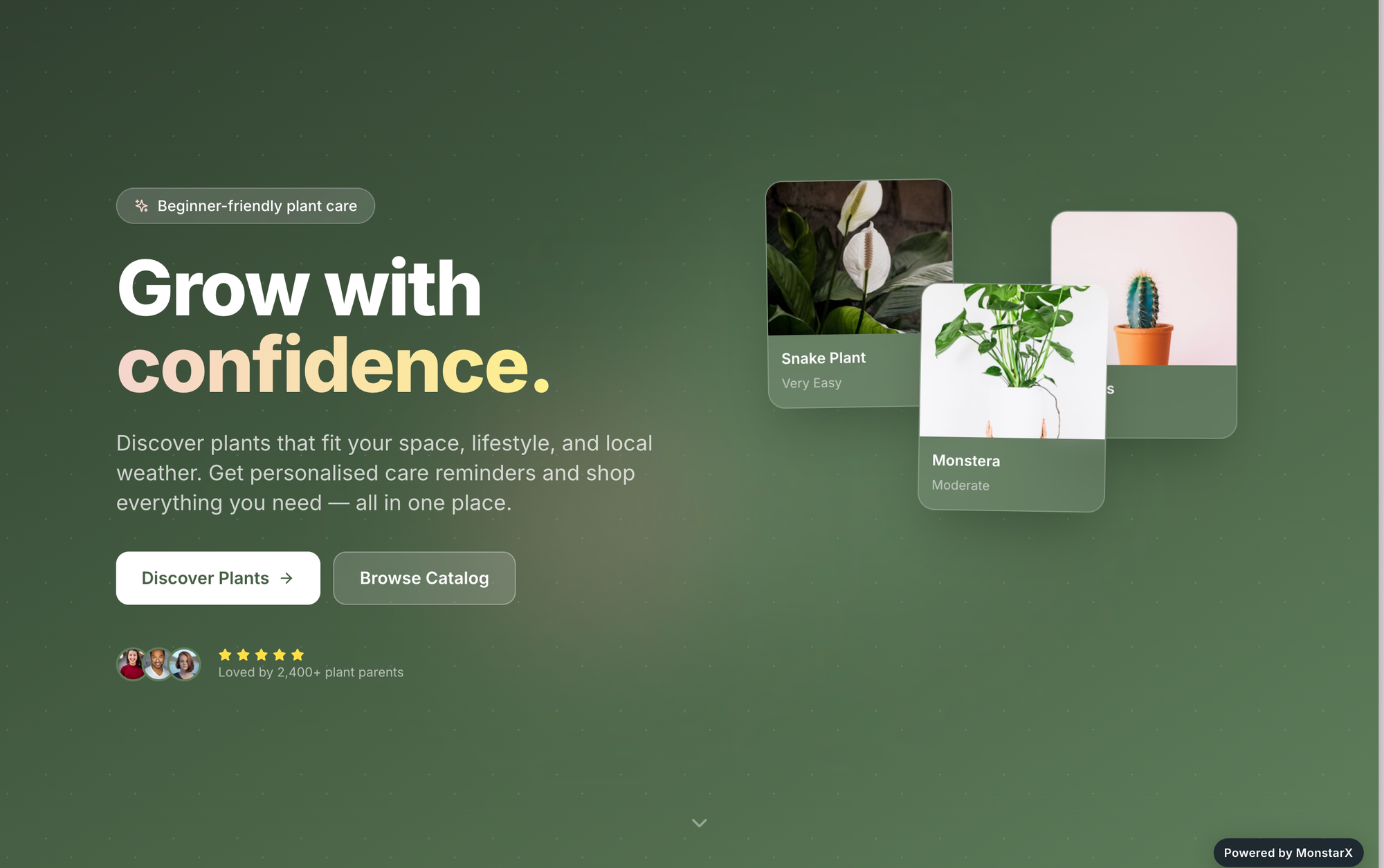
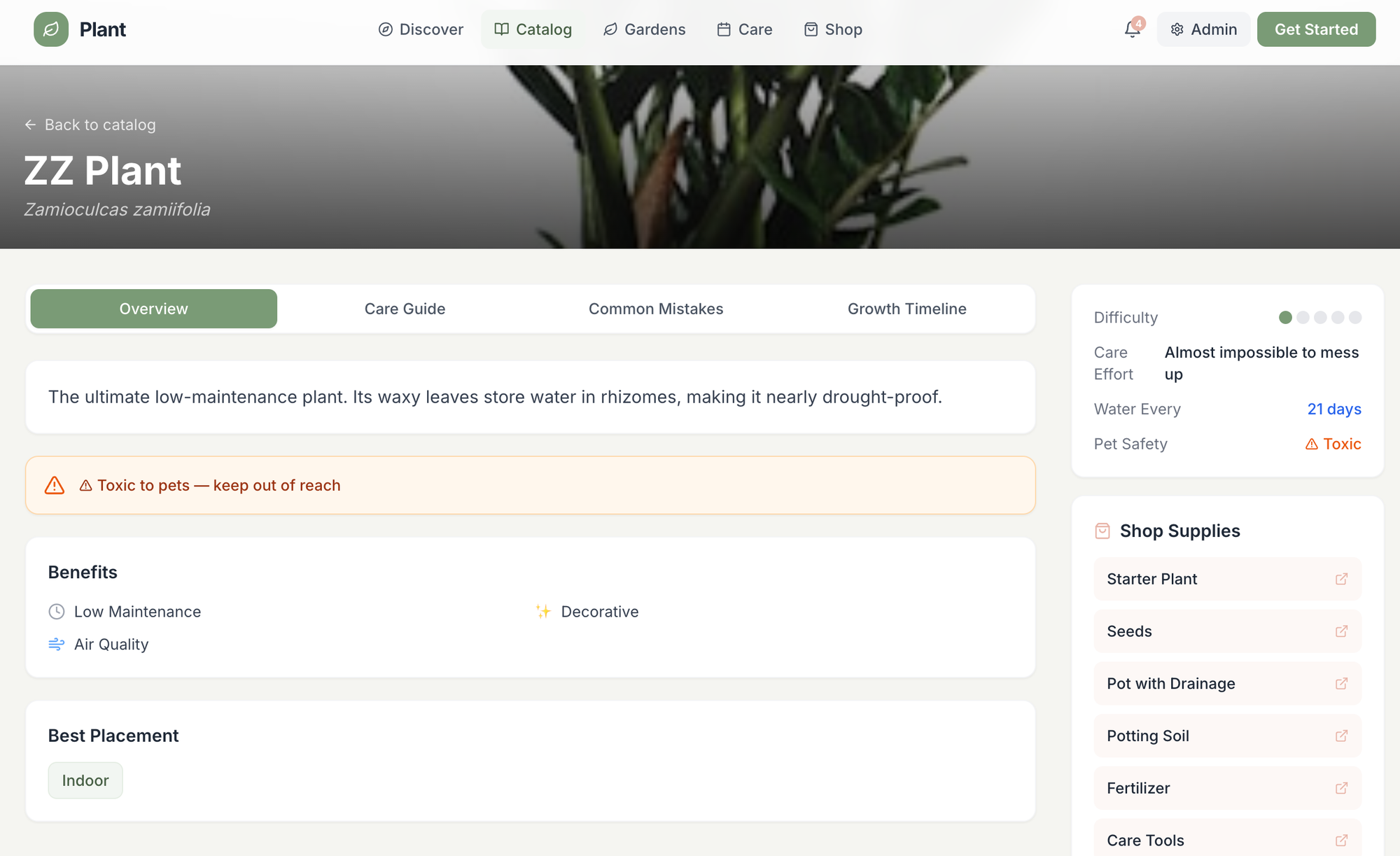
Plank is two things in one. It is a curated, searchable library of houseplants so you can stop falling down a rabbit hole of random content trying to figure out what to buy. And it is an educational layer on top of that directory, with real care guides for every plant covering the things that actually determine whether it survives: light requirements, watering frequency, soil type, common problems.
The goal is simple. Someone who has killed every plant they have ever owned lands on Plank and goes from having no idea what they are doing to knowing exactly which plant to get and how to keep it alive, all in one place, without having to tab between five different websites.
What the Product Actually Looks Like
Let me walk you through the product before I get into how it was built, because I think seeing what it does makes the technical side more meaningful.
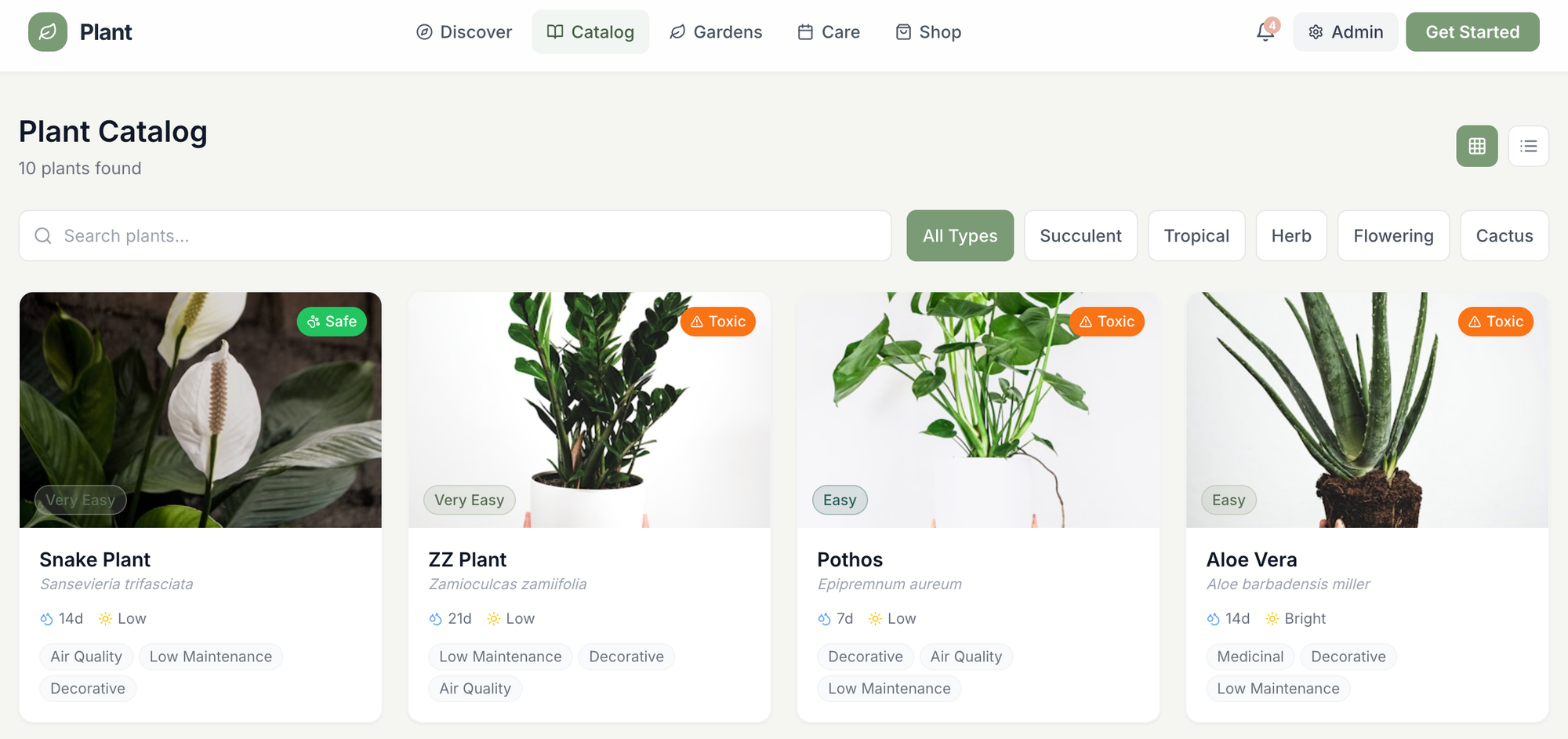
The main view is a directory grid. Every card represents one plant and shows you the name, a one-line description, a tag that tells you what the plant is best at (things like "hard to kill" or "low light champion"), and the essential care information at a glance. It is designed to be scannable, not overwhelming. You should be able to land on the grid and immediately understand what you are looking at.
The filters are where it gets genuinely useful. You can sort and narrow by light needs, by pet safety, or by how much watering the plant requires. So if you have a dark apartment and a cat and a track record of forgetting to water things, you can get to the right plants in one click rather than scrolling through a list of options that do not apply to you. That kind of specificity is the thing that turns a directory into something people come back to.
Click on any individual plant and you land on a full detail page. This is where the educational layer lives. You get the complete care guide: what this plant is, what kind of person it is right for, and a thorough breakdown of how to actually keep it thriving. Not generic advice. Advice that is specific to that plant and to the situations real people encounter when they bring it home.
And then there is the part I am most proud of. If you decide you want to buy a plant after reading about it, you can click through directly to an online store and purchase it. The experience goes all the way from discovery to purchase without ever making you leave the platform or lose the thread of what you were doing.
The AI Plant Finder: This Is Where OpenAI Comes In
Here is the piece of Plank that makes it feel like more than a database with nice styling.
The AI plant finder is a natural language search. Instead of filtering through a dropdown, you can just type what you mean. Things like "I need something that can survive in a bathroom with no windows" or "what should I get if I travel a lot and can not water consistently" or "something safe for my dog that looks dramatic." The kind of questions you would ask a knowledgeable friend rather than a search bar.
The way it works under the hood is straightforward but genuinely clever. When you submit a query, the site sends it to the OpenAI API. OpenAI processes the natural language and returns its understanding of what you are actually looking for. The site then takes that understanding, matches it against the plant data sitting in the Supabase database, and hands you back a curated result. It is not just keyword matching. It is actually understanding intent.
The way I think about the three-layer stack is this: Supabase is the body. It holds all the plant data, the care information, the filters, the structure. MonstarX is the skeleton, the application logic and interface that holds everything together and makes it navigable. OpenAI is the brain. It is the layer that lets the product understand what you mean rather than only what you typed.
One person wired all three of these together. No engineering team. No months of back-and-forth between a designer and a developer and a backend engineer. One person, in a reasonable amount of time, with tools that have genuinely lowered the floor for what is buildable.
How MonstarX Handled the Build
I want to be specific about what MonstarX actually did in this project, because it is easy to undersell it by saying something vague like "it built the frontend." It did considerably more than that.
MonstarX generated the entire application structure from natural language descriptions of what I needed. The plant directory grid, the filter system, the individual plant detail pages, the user account flow, the admin layer for managing the database content, the connection points where the Supabase data hooks into the interface, and the integration surface where the OpenAI API call gets triggered and the result gets displayed. All of it.
The scope selector that MonstarX uses before it starts building was particularly useful for a project like this, because I needed to be clear about what I was building. This was not going to be a marketing site. I needed a full application with a real database, user authentication, and API integrations. Being able to specify exactly what kind of product I was building at the outset meant the system understood the architecture it needed to produce, rather than making assumptions that I would have to undo later.
One of the things I kept noticing as I worked was how MonstarX handled the Connectors.
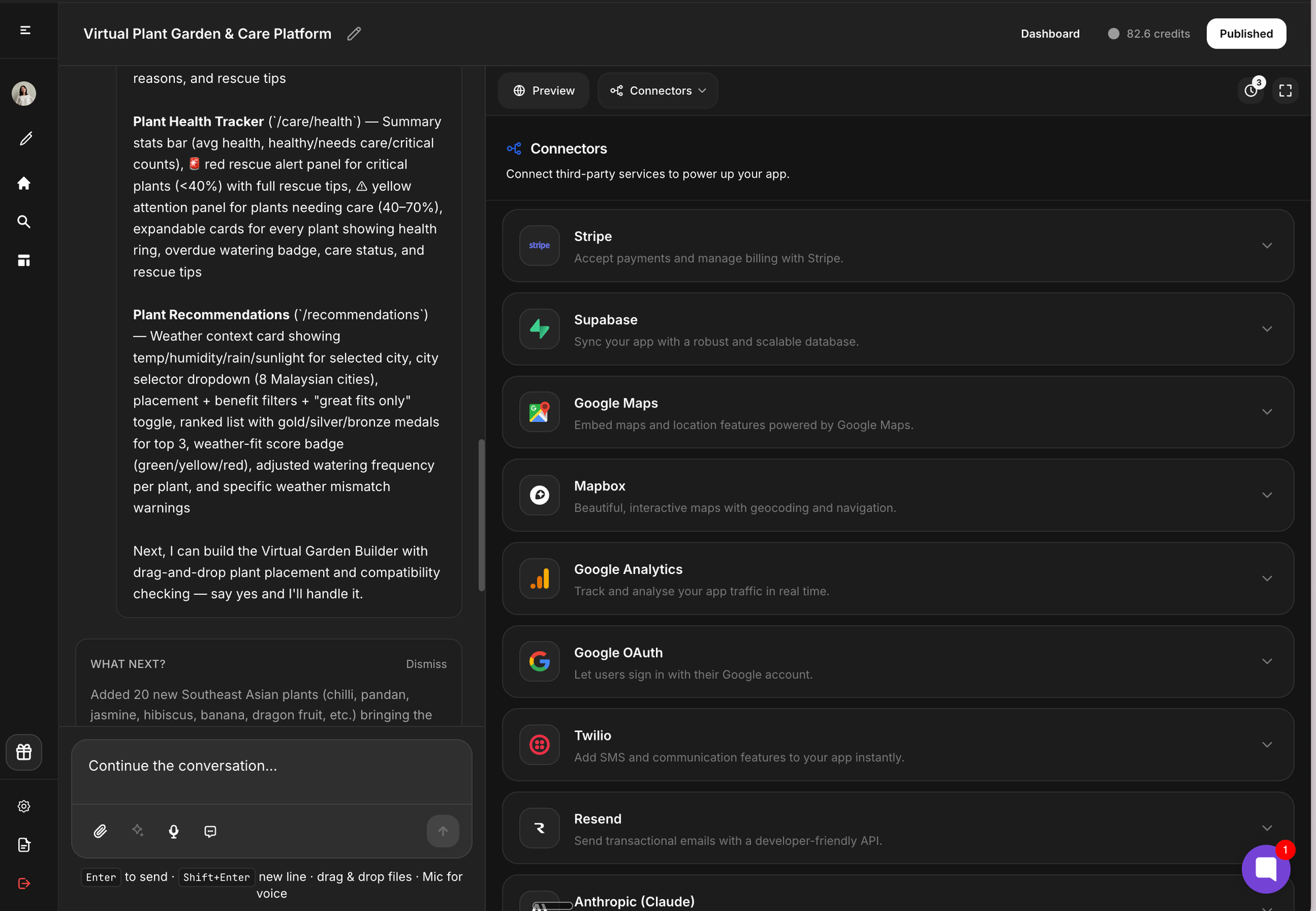
When I needed to plug in the OpenAI API key, I did not have to write any integration code or figure out how the request and response format worked. I went to the Connectors tab, added my key, and the connection was handled. Same with the Supabase setup. The platform understands that these external services need to be part of the application and treats them as first-class parts of the build rather than afterthoughts you bolt on yourself.
The Database: Why Supabase Made Sense
Supabase is an open-source backend platform that gives you a PostgreSQL database, authentication, real-time subscriptions, and an API layer, without needing to set up or manage your own server. For a project like Plank, it is close to ideal.
The plant data needed a proper relational structure. Each plant has multiple attributes: name, description, care requirements, light tolerance, pet safety status, watering frequency, and links to purchase. A spreadsheet would not have handled the filtering and querying well. A real database does.
What Supabase also gives you is the authentication layer, which I needed for user accounts. People who create an account on Plank can save their favourite plants, come back to their shortlist, and eventually get personalised recommendations based on what they have been looking at. The account system is what turns Plank from a read-only directory into something with a return loop, a reason to come back.
I did not write the Supabase schema by hand. MonstarX generated it as part of the build, based on my descriptions of what the data needed to look like and how the filtering and search should work. That is the part of this that still feels slightly unreal to me. A properly structured relational database, generated from a conversation about what I wanted to build.
What This Experience Actually Taught Me
I have thought a lot about how to describe what changed for me after building Plank, and I keep coming back to the same framing: the barrier did not lower a little. It fell through the floor.
There is a version of this story where I had this idea for Plank, spent three months trying to find a developer, spent another three months in a back and forth about specifications and revisions, spent more money than I had budgeted, and ended up with something that was approximately what I imagined but not quite. I know people who have lived that story. I have lived a version of it.
Instead, I described what I wanted, made decisions about the structure and scope as I went, connected three services that handled the heavy lifting, and ended up with a real product.
The more important point is this: Plank is not a demo. It is not something I built to screenshot and put in a portfolio. It solves a real problem for real people. The AI understands what they are asking. The database actually contains the information they need. The accounts actually save their data. Every functional requirement I set out with at the beginning of the project got built.
That is the thing I want you to take from this. If you have an idea, the question is no longer whether you can afford to build it or whether you can find a technical co-founder. The question is just whether you are willing to sit down and start describing what you want.
Frequently Asked Questions
What is the tech stack behind Plank? Plank is built on three tools. MonstarX handles the application structure, the interface, the logic, and the connection points. Supabase provides the database, the authentication system, and the API layer. OpenAI provides the natural language understanding that powers the AI plant finder. Together they form what I think of as the body, skeleton, and brain of the product.
Do you need coding experience to build something like this? No. I am not a developer and I did not write any code to build Plank. MonstarX generates the application from natural language descriptions, Supabase connects through the Connectors tab with an API key, and OpenAI integrates the same way. The technical complexity is handled by the tools. Your job is to know what you want to build and be clear about describing it.
How does the AI plant finder work? When you type a question into the plant finder, the site sends your input to the OpenAI API. OpenAI processes the natural language and returns its understanding of what you are looking for. The application then matches that against the plant data in the Supabase database and returns the relevant results. It is a three-step process: send to OpenAI, get back intent, match against data.
Can MonstarX handle real database integrations like Supabase? Yes. MonstarX treats external services as first-class parts of the build. The Connectors tab includes Supabase as a supported integration. You add your credentials, and MonstarX handles the connection between the application logic and the database without requiring you to write any integration code.
How long did it take to build Plank? The core product came together significantly faster than a traditionally built application would have. The ability to describe what I needed, have it built, check the result, and iterate without a development cycle meant the feedback loop was very tight. The overall build was a matter of days rather than months.
Is Plank actually live and usable? Yes. Plank is a live, deployed product. It is not a mockup or a prototype. The database is real, the AI plant finder works, and user accounts save data properly. Everything that was in scope when I started the project got built.
What would this have cost to build traditionally? A product with this feature set, a searchable database, AI integration, user authentication, a responsive frontend, and an admin layer, would typically cost somewhere between ten and thirty thousand dollars to build with a freelance developer or small agency, and would have taken several months. The total cost of the tools I used is a small fraction of that.
Can I build something similar with MonstarX? Yes. The combination of MonstarX, Supabase, and an AI API is replicable for a wide range of product ideas. Any project that needs a database-backed application with smart search or recommendations can follow a similar architecture. If you have an idea that fits that description, go try it.